


The old model of office building security (a guard in the lobby, keys for tenants, and CCTV nobody watches until something goes wrong) is on its way out. What’s replacing it is a set of systems that actually talk to each other: access control, video analytics, visitor management, and cybersecurity, often monitored from a single cloud dashboard that covers every property you run. Office building security is now something owners compete on, not just something they check a box for.
If you own or manage office space, that shift is worth getting ahead of. Below are eight priorities that matter most, in roughly the order a building actually needs them.
How office security has changed
Office building security used to mean a guard at the lobby, keys for tenants, and a camera system recording footage that nobody looked at unless there was an incident. That setup still exists in older Class B and C buildings, and it isn’t worthless. But it’s no longer what tenants expect, and it’s no longer the standard.
What’s replaced it is layered: access control, video surveillance, visitor management, and cybersecurity all connected, so a single team can watch several properties from one place. Instead of reviewing footage after the fact, the system flags unusual activity while it’s happening. And tenant expectations have climbed right alongside the technology, especially in Class A buildings, where security has quietly become part of how owners win and keep occupancy.
Layered access control is the foundation
If you fix one thing first, fix this. Physical access control is the single most important system in a modern office building, and it’s where keys finally go away. Modern setups use keycards, mobile credentials, or biometric scanners, with every entry logged automatically and permissions managed from cloud software. Lost a credential? Revoke it in seconds, no locksmith, no rekeying the floor.
“Layered” is the part that matters. Different credentials open different zones. Picture a three-tenant building: every tenant gets general building access, their employees get access only to their own floor, and the server rooms, mechanical spaces, and executive suites stay locked to everyone but a named list. Most platforms now sync with HR systems too, so the day someone leaves a company, their access disappears on its own instead of lingering for months because nobody remembered to pull it.
Mobile credentials have become the default. Tenants would rather use their phone than carry a card, and phone-based entry supports touchless access, which most people now treat as a baseline rather than a perk.
Video surveillance with AI analytics
Cameras have moved from passive recording to active detection. Modern video management systems use AI to spot specific behaviors: someone loitering in a stairwell, a vehicle sitting in a fire lane, a door propped open that should be shut. The system alerts your security staff while it’s happening, rather than handing them footage to review after a tenant reports something.
One genuinely useful advance worth asking about: tailgating detection. Tailgating, where an unauthorized person slips through a door behind someone who legitimately badged in, is the most common way people get into office buildings they shouldn’t. Access control alone doesn’t catch it, because the door opened with a real credential. AI cameras can now flag when two people enter on a single badge swipe, which closes a gap that’s frustrated building managers for years.
For coverage, prioritize lobbies, entrances, loading docks, stairwells, elevators, and parking areas. Resolution earns its keep here: 4K cameras with good low-light performance produce footage you can actually use in an investigation or an insurance claim, rather than a blurry shape nobody can identify. Cloud-based systems let you pull that footage from any authorized device, which matters a lot when you’re covering more than one building.
A word of caution, though. AI works best as a second set of eyes, not a replacement for human judgment. Set it up to flag anomalies for a person to review, not to make calls on its own. Get this wrong and you drown your team in false positives, they start ignoring alerts, and the expensive system you installed quietly stops working in practice.
Visitor management has moved to software
A paper sign-in sheet at the front desk is not a security system. Modern visitor management lets tenants pre-register guests, issues a QR-code pass, and tells you exactly who’s in the building at any moment. When a visitor shows up, they’re already in the system, their host gets pinged automatically, and they get a temporary credential that expires when the meeting ends.
For a multi-tenant building, this is the difference between containment and chaos. Someone who talks their way into one suite shouldn’t then be free to wander the rest of the building. Pair visitor management with access control and you get a clean audit trail plus hard limits on where anyone can actually go.
Integrate physical & cybersecurity
The line between physical and cyber security has basically vanished, and pretending otherwise is how buildings get burned. Your access control runs on the building’s network. Your cameras stream to cloud servers. Your building management system runs HVAC, lighting, and security off one dashboard. Every one of those is a way in for an attacker.
So treat your security network with the same seriousness as your office IT. That means strong passwords, two-factor authentication on admin accounts, regular firmware updates, and a written incident response plan, none of which is exotic anymore. One specific thing worth insisting on: have your integrator put the physical security systems on their own dedicated network segment (a separate VLAN), walled off from tenant traffic. That way a vulnerability in a single camera’s firmware can’t become a doorway into everything else.
And when you’re hiring an integrator, ask them directly about their cybersecurity practices. Plenty of physical security installers are excellent with hardware and thin on network security, and that gap is exactly where breaches tend to happen.
Lighting, lobbies, & perimeter basics
The fundamentals still carry a lot of weight. Well-lit walkways, exits, lobbies, and parking lots make a crime harder to commit and make your camera footage actually usable. Motion-activated lighting at loading docks, side entrances, and rear doors does double duty: it signals the building is watched, and it gives your cameras something to see.
Lobbies should funnel everyone through one check-in point. Side doors and emergency exits need contact sensors that alert you the moment they’re propped open, which they will be, because someone always props one open. Loading docks deserve their own cameras and access control, since they’re the classic back-door way into an office building.
None of this needs cutting-edge technology. It needs consistent design and the discipline to actually maintain it.
After-hours monitoring & response
Most office buildings go quiet outside business hours, which is precisely when the gaps show. After-hours monitoring connects your alarms, cameras, and access control to a central station staffed around the clock. When a sensor trips, an operator checks the live feed and either sends on-site personnel or calls emergency responders.
For Class A buildings, this is simply expected. For Class B and C buildings, it’s often the highest-leverage upgrade available, because it turns a passive system that records into an active one that responds. The annual cost is real but predictable, and tenants increasingly ask about it before they sign, which makes it as much a leasing tool as a safety one.
Tenant communication & emergency planning
The technology is only half of it. The other half is making sure tenants know what to do when something goes wrong, because the best system in the world is useless if nobody understands the plan. Every office building needs documented emergency procedures, a mass notification system, and drills people actually run.
Cover the full range: fire, severe weather, medical emergencies, active threats, and power outages. Give tenants clear evacuation routes, shelter-in-place locations, and contact protocols, and run drills at least once a year. After any real incident, sit down and debrief honestly about what worked and what didn’t. This is the unglamorous part where building managers actually earn tenant confidence, or lose it.
One practical note on notifications: reach people through more than one channel (email, SMS, in-app push, building-wide audio), because no single channel reaches everyone. The person who misses the email will hear the announcement, and the one with their phone on silent will see the push later.
What each security layer covers
A quick reference for the five core layers, what each one handles, and why it earns its place in the budget.
| Security layer | What it covers | Why it matters |
|---|---|---|
| Access control | Building, floor, and zone permissions | Eliminates physical keys; instant mobile revocation |
| Video surveillance | Active monitoring with AI analytics | Real-time threat detection, including tailgating, plus a forensic record |
| Visitor management | Guest pre-registration and tracking | Limits unauthorized movement in multi-tenant buildings |
| Cybersecurity | Network security for connected systems | Protects access control, building systems, and tenant data |
| Perimeter and after-hours | Lighting, loading docks, and 24/7 central station | Closes physical gaps and ensures active response when the building is empty |
How to prioritize your upgrades
If you’re working from a fixed budget, don’t try to deploy everything at once. Sequence the work by risk and tenant impact, and each phase builds on the one before it:
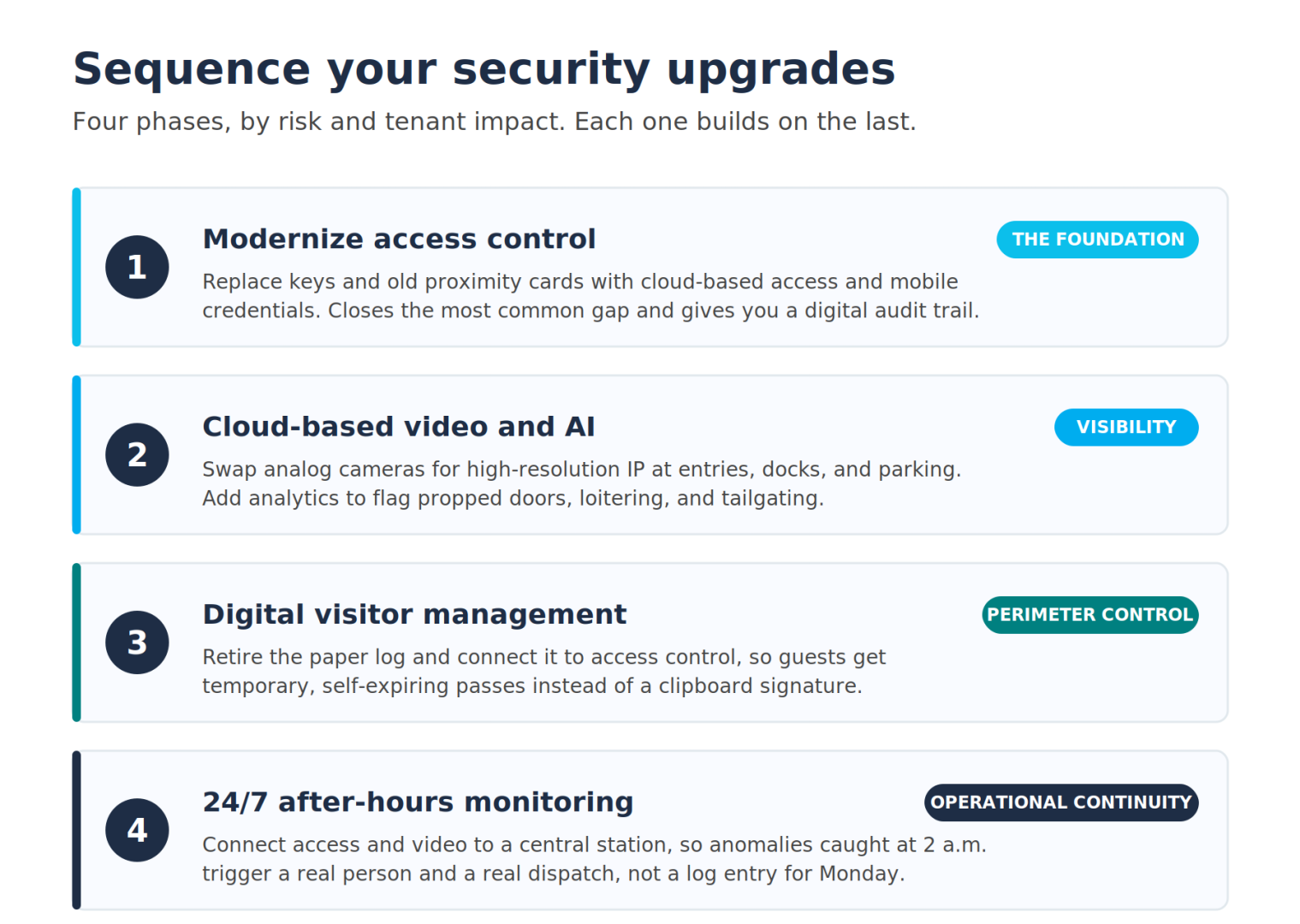
For a portfolio, lean toward systems that run every site under one management platform. The time you save monitoring everything from a single dashboard adds up fast. And if you’re not sure where your building actually stands, a qualified security integrator can walk you through a risk assessment specific to your property before you spend a dollar.
Frequently Asked Questions (FAQ)
What is the most important security system in an office building? Access control is the foundation. It governs who gets into which parts of the building, logs all activity, and lets you revoke permissions instantly. Without solid access control, the other layers (video, visitor management, alarms) lose much of their value.
How much does office building security cost? Entry-level access control starts around $1,500 per door. A comprehensive system for a larger building (access control, video, visitor management, and after-hours monitoring combined) can run from tens of thousands to several hundred thousand dollars depending on size and complexity, with monitoring and software subscriptions adding to the ongoing cost.
Do cameras with AI actually detect threats better? They cut down on false alarms and surface real concerns faster than passive recording, flagging things like loitering, unauthorized parking, doors left ajar, and tailgating in real time. They work best paired with human review of flagged alerts rather than acting on their own.
Why does cybersecurity matter for physical office security? Access control, video, and building management systems all run on networks, so a cyber breach can compromise physical security directly: an attacker can unlock doors, disable cameras, or pull building data. Treating physical and cyber security as one system is now standard practice.
What’s the difference between security in Class A and Class B buildings? Class A buildings typically run staffed lobbies, cloud-based access control, AI video, integrated visitor management, and after-hours central station monitoring. Class B and C buildings often rely on older systems with fewer integrations, which is exactly why upgrading them is one of the highest-leverage moves an owner can make to compete for tenants.
How often should office buildings run security drills? At least once a year, ideally across several scenarios: fire, severe weather, medical emergencies, and active threats. After any real incident, debrief honestly and document what needs to change. Regular drills double as a retention tool, since they signal to tenants that the building takes safety seriously.



Matthew Preston
Content Writer, CRE News & Market Analysis
Matthew has covered commercial real estate for CommercialCafe since 2022. He focuses on the office and industrial sectors, reporting on leasing, development, and investment across national markets and individual submarkets. His work draws on data and original research. He also writes about demographic shifts and urban innovation in U.S. cities. The New York Times, The Real Deal, Bisnow, The Business Journals, and Yahoo Finance have cited his reporting.